Archive for Value Stream Marketing

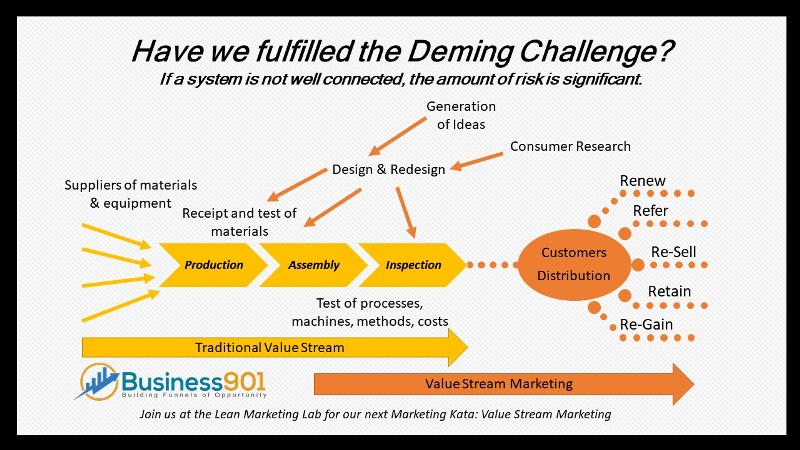
Value Stream Mapping has been a practice that was first introduced in the book Learning to See: Value Stream Mapping to Add Value and Eliminate MUDA by Mike Rother and John Shook. This groundbreaking workbook, which has introduced the value-stream mapping tool to thousands of people around the world, breaks down the important concepts of value-stream mapping into an easily grasped format. Dan Jones and Jim Womack followed that book with Seeing the Whole Value Stream which took the mapping methodology through an improvement process that converted the traditional value stream of isolated operations to a broader view of the entire value stream.Lean

Recently the co-authors, Womack and Jones in response to feedback asking for examples in other sectors and questions about how to understand supply chain costs more accurately, have added five essays to the book for this new edition. These essays demonstrate how real companies have taken on the challenge of improving their extended value streams working in collaboration with their suppliers and customers.

The new essays for the book are:

  • Spreading value-stream thinking from manufacturers to final customers through service providers—extending the wiper example.
  • Applying extended value-stream thinking to retail—a look at the Tesco story.
  • Learning to use value-stream thinking collaboratively with suppliers and customers.
  • Product costing in value-stream analysis.
  • Seeing and configuring the global value stream.

The one particular essay that stood out to me was Learning to use value-stream thinking collaboratively with suppliers and customers. The objective of this effort was to garner their suppliers and customer in a true collaborative effort to create value. It was the first time any of these five companies had ever viewed a shared value stream. They started with a few modest objectives for improvement. However, it turned into much more than an improvement effort but rather a deeper type of organizational relationship. The reason they cited was that they learned how to communicate with each other. You can view the experience: Video of Matthew Lovejoy’s presentation on the Acme Alliance story.

This story exemplifies the power of collaboration and what can be developed from it. Collaboration in a Value Stream Mapping exercise can be a difficult process. You open your doors to all the skeletons you have in the closet for both vendors and customers to see. Most people are surprised by the reactions. It is typically not one of disgust or insecurity but rather a helping hand is extended and many times consideration that certain requirements may not even be needed.

The spirit of this venture serves a valuable insight that co-producing, co-creation and open innovation is not as far-fetched as it may seem. A single Value Stream Mapping process led to four years of increasing engagement. I wonder what would happen is they shorten that iteration a bit?

P.S. If your 1st edition of the book looks like mine, it’s time for the 2nd edition anyway.

Related Information:
Six Sources of Influence in Change
The Difficulty of Mastery = The Difficulty of Lean
Start with Journey Mapping vs Value Stream Mapping
Value Stream Mapping

Share this:
Share this page via Email Share this page via Stumble Upon Share this page via Digg this Share this page via Facebook Share this page via Twitter
Comments (0)

Value Stream Mapping is a process most consider an exercise for finding and removing waste. It is a foundational Lean Tool that typically gets introduced early in a Lean Transformation. A Systems2win Excel template is depicted below:

In Sales and Marketing you will utilize a Value Stream Mapping process on a project by project basis but it is typically limited to an internal process. It is a difficult correlation for customer facing experiences. The preferred method of mapping the customer experience is through a journey map. I prefer two styles, one a basic Excel Template that is very similar to a typical Swim Lane chart commonly used in Lean.

From Smart Cities – A guide to using Customer Journey Mapping

Another is circular method demonstrated by the Lego Wheel. Lego uses tool called a ‘customer experience wheel’ to map an existing experience. “We understand what is and what is not important to the customer in that experience and then we design a ‘wow’ experience to improve it.” Though I like the wheel better I have not found a program that could make it easy for me to draw and distribute.

The advantage of creating this map utilizing the Excel template is that you can easily add notes and drill down further down into a process by adding columns and rows. Drawing in Excel is rather easy once you understand how, Become Proficient Drawing with Excel in 30 minutes!and remember you can do MATH, CHARTS and everything else you already know about Excel. If you want more information on how to create a journey map below is an excellent slide show describing the process. If you want to learn more about Value stream Mapping, drawing in Excel or Swim Lanes, I would recommend downloading the trail templates at Systems2win.com.

The Journey Mapping Guidance Cabinet Office[1]

View more presentations from Gerald Power
A good post on discussing some of the pros and cons of different types of Journey Maps can be found at Visualizing the customer experience using customer experience journey maps. You may also want to consider viewing the Lean Marketing Game presentation. It is based on extending the journey map through out your organization.

Related Information:
Continuous Improvement Sales and Marketing Toolset
Designing for Growth: A Design Thinking Toolkit for Managers (Columbia Business School Publishing)
Can Service Design increase Customer demand?

Share this:
Share this page via Email Share this page via Stumble Upon Share this page via Digg this Share this page via Facebook Share this page via Twitter

Using Microsoft Excel as a drawing tool is a surprise to most of us. When we think of using Excel, we think of creating a spreadsheet and maybe if we are adventurous creating a graph. But there is a hidden power contained in Excel, the ability to draw. One of my most popular blog post of all time, Draw your Value Stream Map in Excel includes a You Tube video of the rendering of a Excel drawing depicting Transformer (You remember the Children’s heroes). If you need proof take a look at these drawings from The Spreadsheet Page:

It turns out that Debbie is an artist, and she uses Excel as her primary drawing software (now that’s odd!). The figure below shows an example. The image on the left was scanned from a catalog. The image on the right was created by Debbie, using Excel’s drawing tools. The drawing consists of hundreds of individual shapes, combined together.

According to Debbie, “Most of my drawings do not take longer than two hours or four hours max to get the outlines done and the fill colors put in. I often use photographs that I’ve scanned and inserted into Excel, then I use the drawing tools to change the photographs into drawings. As you have already noticed I’ve become quite proficient at drawing on Excel, so it doesn’t take me as much time as it did when I first started, now that I’ve figured out all the tricks.

I have a tendency to use other more “graphic” software packages in lieu of Excel but I am amazed at the simplicity of using Excel once you start. Why should I care? Most of the tools of Lean are visual in nature. In fact, one of the sayings that have been very common in Lean is “If you’re not visual, you’re not Lean.” However, in Lean and with any continuous improvement methodology metrics are important. So, if you want to be successful you cannot divorce the visual aspect and the metrics. Excel offers the marriage between the two.  Listen to the advantages described by Dean Ziegler of Systems2win:

Can you become proficient in only 30 minutes? Watch these Systems2win videos to learn how:
Types of Drawing Objects
How to Select Objects
How to use Excel as a drawing tool

Share this:
Share this page via Email Share this page via Stumble Upon Share this page via Digg this Share this page via Facebook Share this page via Twitter
Comments (0)

I worked the Systems2win booth this week at the AME Conference in Dallas, TX. I enjoy the opportunity tremendously as I get to spend a great deal of time with hundreds of Lean Practitioners in a variety of positions and industries. Discussing the Systems2win word and excel continuous improvement templates offers me the opportunity to revisit many of the basic Lean principles.

You need leadership and a mindset or cultural shift in a Lean Transformation but I support the thinking that most of us use tools to learn and sustain improvement efforts. If we are unable to use the tools, we can’t implement. I use the analogy that a carpenter becomes a carpenter by becoming proficient with a hammer. You become proficient with Lean by using Value stream Mapping, Standard Work and the others.

I stray away from some of the traditional tools of Lean as a result of my work in sales and marketing. Spending the time in the booth discussing the breadth (there are over 150 templates) of Lean foundational tools that Systems2win supplies was for me a refresher course. It re-cemented the practical applications of Lean to standard work (no pun attended). Lean is firmly rooted in accomplishing work. It is not about creating elaborate control structures. It is simply about learning by doing and how better to accomplish that but through the use of the tools.

After coming home, I looked through a few of the Systesm2win templates on YouTube to strengthen that learning. I have included the Introduction to Value Stream Mapping.

I found that taking a Value Stream Mapping project off of a board and documenting it on software besides the obvious attributes of archiving and sharing, it creates, distributes and reinforces the knowledge of the process and the use of the mapping process for other projects.   

Related Information
Data Driven Problem Solving Program
Lean or Six Sigma which fork in the road do you take?
Continuous Improvement Sales and Marketing Toolset

Share this:
Share this page via Email Share this page via Stumble Upon Share this page via Digg this Share this page via Facebook Share this page via Twitter
Comments (0)